Quick answer
A favicon generator turns one square image into the icon files a site needs. Image Edtr creates favicon.ico with 16, 32, and 48 px images, a 180 px apple-touch-icon.png, and 192 and 512 px PNGs for a web app manifest, zipped together with the HTML to paste into your page’s head.
A favicon is tiny, but it shows up in more places than most images on your site: browser tabs, bookmarks, history, search results on some engines, and phone home screens. Each of those places draws the icon at a different size, on a different background, on screens with different pixel densities. This guide explains which files you need, why there are several, and how to add them correctly.
What a favicon generator makes, and why one image isn’t enough
You could point every browser at a single large PNG and let it scale down. It works, sort of. But scaling a 512 px image to 16 px on the fly can look soft, a browser may download a much bigger file than it needs for a tab, and some places only look for icons in specific files at specific paths. A favicon generator does the resizing once, carefully, and packages the files that each platform expects.
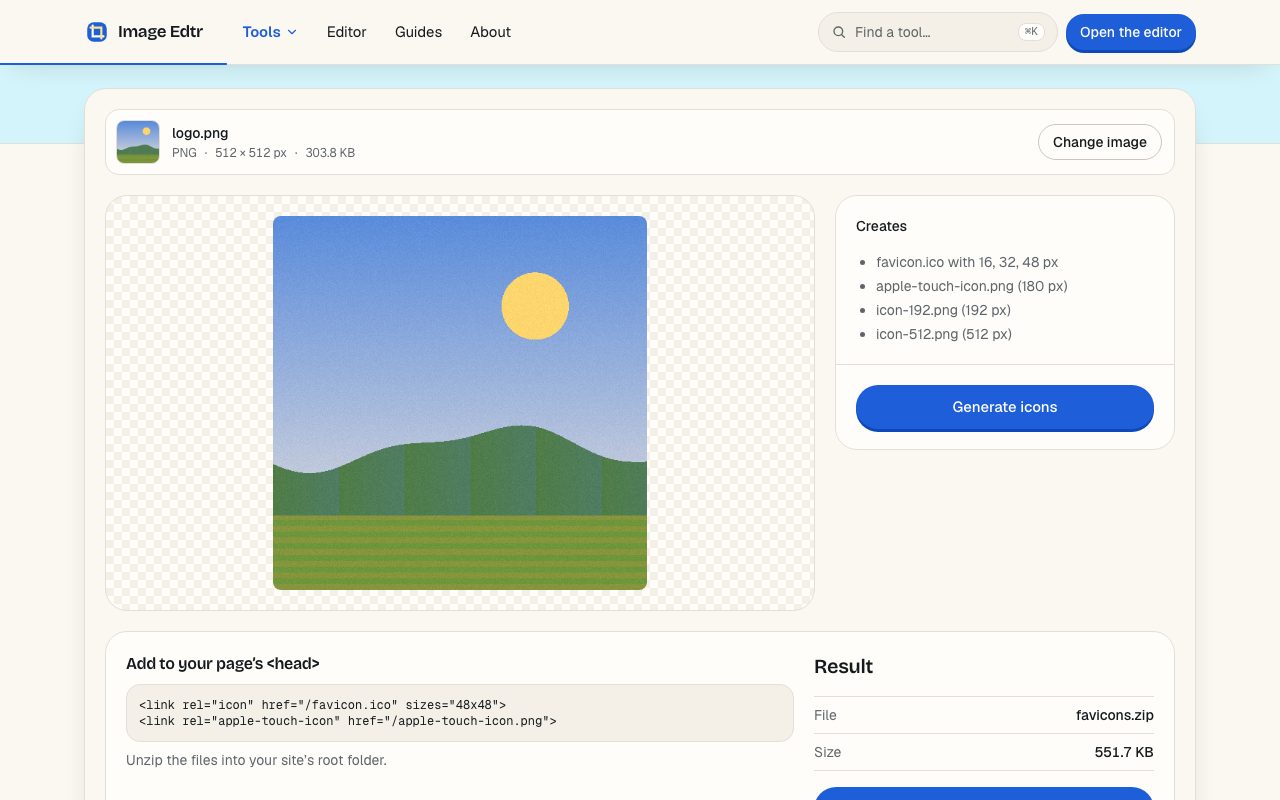
Image Edtr’s favicon generator creates four files from your image and puts them in one ZIP:
favicon.ico, a single file that contains three images: 16 × 16, 32 × 32, and 48 × 48 px.apple-touch-icon.png, 180 × 180 px, used when someone adds your site to an iPhone or iPad home screen.icon-192.png, 192 × 192 px, for a web app manifest.icon-512.png, 512 × 512 px, for a web app manifest and install or splash screens.
Favicon sizes: which ones you need and where each is used
Here is the full set Image Edtr generates, and the job each size does. These cover current desktop and mobile browsers without a long list of rarely used extras.
| Size | File | Where it’s used |
|---|---|---|
| 16 × 16 px | inside favicon.ico | Browser tabs and bookmarks on standard-density screens |
| 32 × 32 px | inside favicon.ico | Tabs on high-density (2×) screens; some taskbars and shortcuts |
| 48 × 48 px | inside favicon.ico | Larger desktop shortcuts and places that ask for a bigger icon |
| 180 × 180 px | apple-touch-icon.png | iPhone and iPad home screen when a visitor adds your site |
| 192 × 192 px | icon-192.png | Web app manifest; Android home screen and app launchers |
| 512 × 512 px | icon-512.png | Web app manifest; install prompts and splash screens |
How do browsers pick a favicon size?
A browser looks at the icons your page declares and chooses the one that best fits the space it needs to fill, measured in device pixels. A tab icon is drawn at about 16 CSS pixels. On a standard screen that’s 16 device pixels; on a 2× screen, such as most modern laptops and phones, it’s 32. That’s why the 32 px image matters as much as the 16 px one.
An ICO file is a small container that holds several images of different sizes. When a browser reads favicon.ico, it can pick the entry closest to what it needs instead of scaling one image. That’s the main reason ICO still exists for favicons: one request, several sizes.
Browsers also have a fallback. If a page doesn’t declare an icon at all, most will request /favicon.ico from the root of your site. Putting the file there, with a matching <link> tag, covers both paths.
Home screens and installed apps work differently. iOS looks for an apple touch icon declared with rel="apple-touch-icon". Android and installable web apps read the icons listed in your web app manifest and choose among their sizes values. The MDN page on manifest icons documents those fields.
How to make a favicon with Image Edtr
Choose an image
Pick a square PNG, JPEG, WebP, or other common image, ideally at least 512 × 512 px. It stays on your device.
Check the preview
The panel lists the files it will create. If the image isn’t square, a note tells you it will be centered on a transparent square.
Select Generate icons
Your browser renders each size and packs the three small ones into
favicon.ico.Download the ZIP and copy the snippet
Download
favicons.zip, unzip it into your site’s root folder, and paste the HTML shown under the result into your page’s<head>.
How to add a favicon: the HTML code
After unzipping the files into the root of your site, so they’re served at /favicon.ico and /apple-touch-icon.png, add these two lines inside <head> on every page. Most frameworks and site builders have a shared layout or template where this belongs.
<link rel="icon" href="/favicon.ico" sizes="48x48">
<link rel="apple-touch-icon" href="/apple-touch-icon.png">
The first line points browsers at the ICO and its sizes. The second gives iOS a sharp home screen icon instead of a screenshot of your page.
The 192 and 512 px PNGs are used through a web app manifest, a small JSON file you link with <link rel="manifest" href="/manifest.webmanifest">. Image Edtr doesn’t write the manifest for you, because it also holds your app’s name, colors, and start URL. A minimal icons entry looks like this:
"icons": [{ "src": "/icon-192.png", "sizes": "192x192", "type": "image/png" }, { "src": "/icon-512.png", "sizes": "512x512", "type": "image/png" }]
favicon.ico and apple-touch-icon.png are enough. Keep the two PNGs for later, or delete them.What is the right apple touch icon size?
180 × 180 px. Current iPhones display home screen icons at roughly 60 points, and at 3× density that’s 180 pixels. iPads use smaller values, and iOS scales the 180 px file down for them, so one file covers every current device.
iOS applies its own rounded-corner mask, so don’t round the corners yourself; you’d end up with a double curve. It also doesn’t keep transparency on the home screen. If your logo sits on a transparent background, transparent areas may be filled with a solid color, often black. For the best result, start from a version of your logo on a solid background color for this icon.
Designing a favicon that reads at 16 pixels
Most favicon problems aren’t technical. A detailed logo simply can’t survive being drawn in a 16 × 16 grid, which is 256 pixels in total. A few rules that hold up:
- Use a symbol, not a wordmark. A full company name becomes a gray smudge. Use the logo’s icon, a single letter, or a simple shape.
- Keep shapes bold. Thin lines under about one pixel wide at 16 px fade or blur. Thicken strokes in a version made just for small sizes.
- Fill the square. A small mark with lots of padding looks tiny next to other tabs. Let it reach close to the edges.
- Check both themes. Browser tabs can be light or dark. A dark logo on transparency can vanish on a dark tab bar; a subtle outline or a solid background fixes that.
- Start square and large. A 512 × 512 px source gives every size enough pixels to work with. If your source isn’t square, crop it first with the crop tool using the 1:1 preset so you choose the framing rather than getting automatic padding.
If you have your logo as an SVG, convert it to a large PNG first with the SVG to PNG tool, then use that PNG here. The SVG to PNG guide explains how to pick an output size.
Do you need more favicon sizes than these?
Older favicon checklists list a dozen or more files: Apple icons at 57, 72, 114, 120, and 152 px, Windows tile images with a browserconfig.xml file, and assorted sizes for platforms that no longer exist. Most of those served devices and browser versions from years ago. Current iOS scales the 180 px apple touch icon down when it needs a smaller one, and current browsers pick from the ICO entries.
Extra files don’t hurt, but each one is something to keep in sync when your logo changes. Starting with the six sizes above and adding more only when a specific platform you support asks for them keeps the setup small and easy to update.
One exception worth knowing about is maskable icons. Android can crop installed app icons into circles, squircles, or other shapes. A manifest icon marked "purpose": "maskable" tells the system the artwork has enough padding to survive that crop. The PNGs Image Edtr creates use your image edge to edge, so if you need a maskable icon, add generous padding around the mark in your source image first and generate a separate set from it.
PNG inside ICO: what “PNG-compressed entries” means
Historically, each image inside an ICO file was stored as an uncompressed bitmap (BMP). Since Windows Vista, the format also allows each entry to be a complete PNG file, which is smaller and keeps full alpha transparency. Image Edtr writes PNG entries for all three sizes.
All current major browsers read PNG entries without issue. The only place it can matter is very old Windows software that expects bitmap entries. If you’re building for that kind of environment, you’ll need a desktop tool that writes BMP-based ICO files, because this generator doesn’t.
Favicon not showing? Common fixes
| Symptom | Likely cause | Fix |
|---|---|---|
| Old icon still shows | Browsers cache favicons aggressively | Open the icon URL directly, then hard-refresh the page; or test in a private window |
| No icon at all | File isn’t at the path in the <link> tag | Open /favicon.ico in the browser; if it 404s, move the file or fix the href |
| Icon on some pages only | The <link> tags are only in one template | Put them in the shared layout used by every page |
| Blurry tab icon | Only a large PNG is declared, scaled down by the browser | Declare favicon.ico with its 16, 32, and 48 px entries |
| Black square on iPhone home screen | Transparent apple-touch-icon.png | Regenerate it from a logo on a solid background |
| Icon missing in search results | Search engines refresh favicons on their own schedule | Make sure the file is crawlable and wait for a recrawl |
Caching deserves a second look, because it causes most “I changed it and nothing happened” reports. Browsers keep favicons in a separate cache that a normal reload doesn’t always clear. When you replace an icon on a live site, you can force a fresh download by changing its URL, for example href="/favicon.ico?v=2", and updating the same version number in the apple touch icon tag. Visitors will pick up the new file the next time they load a page.
example.com/blog/), use paths that match where the files really are, such as /blog/favicon.ico, in both the href and your manifest.Generating icons happens entirely in your browser, so you can make a favicon for an unannounced product without sending the logo anywhere. When you’re ready, unzip, paste the two lines, and reload.
Frequently asked questions
What size should my source image be for a favicon?
Use a square image of at least 512 × 512 px. That’s the largest file the generator creates, so every smaller size is a downscale, which stays sharp. A smaller source still works, but the 192 and 512 px PNGs will be upscaled and may look soft on large displays.
Do I still need favicon.ico, or is a PNG favicon enough?
Modern browsers accept a PNG declared with a <link rel="icon"> tag. An ICO is still useful because it holds several sizes in one file and covers tools and browsers that request /favicon.ico automatically. Shipping both an ICO and the PNG app icons is the safe default.
What happens if my image isn’t square?
It’s scaled to fit and centered on a transparent square, so nothing is cut off, but you’ll get empty space on two sides. For a fuller icon, crop the image to 1:1 first so you choose exactly which part fills the square.
Can I use an SVG favicon instead?
Many current browsers support an SVG declared with <link rel="icon" type="image/svg+xml">, and it can even adapt to dark mode with CSS. This generator doesn’t output SVG favicons, but you can add one alongside the ICO. Browsers that don’t support SVG icons will use the ICO.
Does the generator create a web app manifest file?
No. It creates icon-192.png and icon-512.png, which a manifest references, but the manifest also needs your app’s name, start URL, and colors. Write it yourself, link it from your <head>, and list both PNGs in its icons array with their sizes and type. Regular websites that aren’t meant to be installed can skip it.
Why does my favicon look blurry in the browser tab?
Usually the browser is scaling a large image down on the fly, or the design has details too fine for 16 px. Declare favicon.ico, which includes dedicated 16 and 32 px images, and simplify the mark with bolder shapes for small sizes.
Where do I put the favicon files?
In the root of your site, so they’re served at /favicon.ico and /apple-touch-icon.png. In many frameworks that’s a public or static folder. If you put them elsewhere, update the href in each <link> tag to match, and open each URL in your browser once to confirm it loads.